
By default, WordPress image URLs follow a format like https://imzl.com/wp-content/uploads/2012/07/1.png. However, using URLs like this isn’t great for WordPress performance. I recommend storing your WordPress site’s images, JavaScript, and CSS under a cookie-free domain (a cookie-free domain won’t generate cookies). If you don’t have a cookie-free domain, you can use a subdomain of your blog, though you’ll need to configure it to not pass cookies — detailed instructions follow below. Cookie-free domains can be purchased from domain registrars. A dedicated cookie-free domain will always perform better than a subdomain, since cookie-free domains don’t generate cookies at all, while subdomains do.
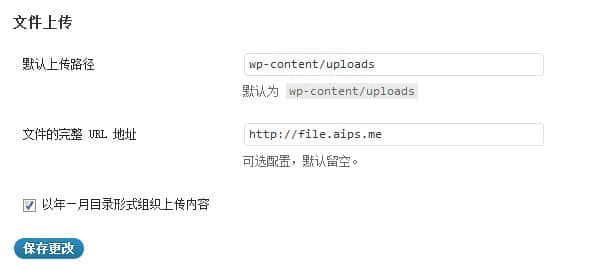
- Storing images on a separate domain is straightforward. For the lazy approach, go to the WordPress backend’s “Media” settings to configure the upload directory, then bind the domain in your hosting control panel (bind the domain to the
/wp-content/uploadsdirectory). After that, all images uploaded through the backend will use your custom domain on the frontend.
-
To serve CSS and JS from a separate domain, no special configuration is needed — it’s just a bit tedious. You need to upload your WordPress theme’s image folder along with all JS and CSS files to the server bound to the separate domain, then update the paths in your CSS.
-
If you don’t have another domain, you can bind a subdomain in your hosting and add the following to
wp-config.php:
define('COOKIE_DOMAIN', 'cdn.imzl.com');
This ensures WordPress cookies are only sent to the main domain and not to subdomains. Remember to change the domain in the code to your blog’s main domain — this defines cookies to be passed only to the primary domain while subdomains remain cookie-free.
- The methods above are the most basic acceleration techniques. You can also use UPYUN cloud storage, which supports custom domain binding (requires ICP filing). For users without filing, UPYUN provides free cookie-free domains, and UPYUN storage itself comes with built-in file acceleration. If you feel that’s still not fast enough, you can use W3 Total Cache with UPYUN for full-site WordPress CDN acceleration to cache all WordPress files on UPYUN — the speed improvement will be on a completely different level!