
Let me use my blog as an example. When embedding videos from sites like Youku, Flash automatically renders on the topmost layer. When you scroll the browser, the Flash player overlaps the theme’s Topbar (you know, that sticky bar similar to a toolbar plugin).
As shown below:

So how do we prevent the video from covering the topbar? Alright, let’s cut to the chase.
1. Using Youku as an example, copy the HTML code from the share option.

2. Paste the code into the WordPress post editor in HTML mode.

3. Switch to “Visual” mode, then switch back to HTML mode. The code will automatically transform into a longer version (this step is crucial).
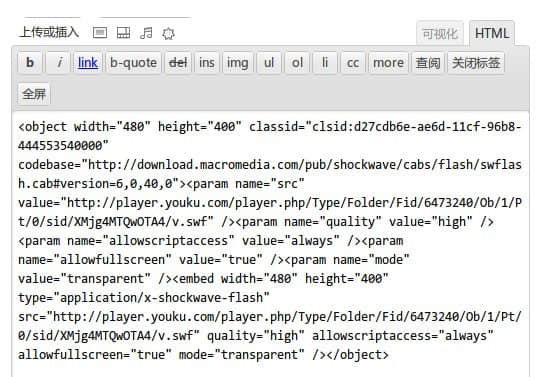
- Here’s the code — let’s analyze it:
<object width="480" height="400" classid="clsid:d27cdb6e-ae6d-11cf-96b8-444553540000" codebase="http://download.macromedia.com/pub/shockwave/cabs/flash/swflash.cab#version=6,0,40,0">

<param name="src" value="http://player.youku.com/player.php/Type/Folder/Fid/6473240/Ob/1/Pt/0/sid/XMjg4MTQwOTA4/v.swf" />

<param name="quality" value="high" />

<param name="allowscriptaccess" value="always" />

<param name="allowfullscreen" value="true" />

<param name="mode" value="transparent" />

<embed width="480" height="400" type="application/x-shockwave-flash" src="http://player.youku.com/player.php/Type/Folder/Fid/6473240/Ob/1/Pt/0/sid/XMjg4MTQwOTA4/v.swf" quality="high" allowscriptaccess="always" allowfullscreen="true" mode="transparent" />

</object>-
Change
<param name="mode" value="transparent" />to<param name="wmode" value="opaque" /> -
Change
mode="transparent"at the end of the embed tag towmode="transparent".
PS: If you’re not sure how to convert the code, you can directly copy the code I’ve provided above — but don’t forget to change the swf URL, or the video will still be mine!