
WordPress Widgets are incredibly powerful. A typical WordPress blog’s sidebar will feature widgets for recent posts, recent comments, blogroll links, and more. Most sites cache their article pages, but what about the sidebar? Few people pay attention to that (except those using static page caching). To make your WordPress site truly fly, caching your widgets is a must.
As we all know, WP-Cache, WP Super Cache, and W3 Total Cache are popular plugins for caching web pages — that is, caching article and content pages. Today I’ll introduce both plugin-based and code-based methods for caching WordPress sidebar widgets, which also serve to speed up page rendering. This will help us improve sidebar widget loading speed and make your WordPress site faster!
WP Widget Cache Plugin Features
- Supports timed cache refresh
- Supports trigger events (e.g., publishing a post) to automatically refresh cache
- Supports selective widget caching (e.g., you can cache the recent posts widget but not the random posts widget)
- Simple installation and setup, no source code modifications required (much simpler than WP-Cache)
WP Widget Cache Plugin Installation:
- Download the WP Widget Cache plugin, extract it, and upload to the
/wp-content/plugins/folder (or install via the WordPress backend). - Activate the plugin from the WordPress admin Plugins page
In the admin panel, go toSettings --> WP Widget Cacheto configure the plugin, as shown below:
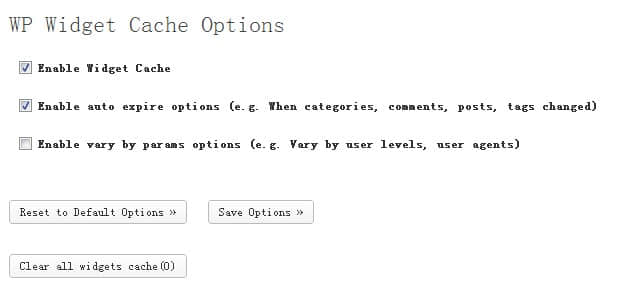
Of course, if you prefer not to use a plugin, you can refer to the following code to cache data directly using the Widget Class’s update_callback() method.
class Test_Widget extends WP_Widget {
// Register Widget
function register() {
register_widget('Test_Widget');
}

// Constructor
function construct() {
$widget_ops = array('classname' => 'test_widget', 'description' => ( 'Test Widget') );
parent::construct('test_widget', ('Test Widget'), $widget_ops);
}

// Widget main output
function widget( $args, $instance ) {
extract( $args );
// If cache has expired, regenerate the result
if(false === get_transient($args['widget_id'])) {
/
……
Execute widget body, save output to $data variable
…… /
// Cache result for 1 hour
set_transient($args['widget_id'], $data, 3600);
} else {
echo get_transient($args['widget_id']);
}
//……
}

// Save Widget parameters
function update( $new_instance, $old_instance ) {
$instance = $old_instance;
// Delete existing cache when updating parameters
delete_transient($this->id);
//……
return $instance;
}

// Widget settings panel
function form( $instance ) {
//……
}

// This function is newly added to delete cache
function update_callback($widget_args = 1) {
// Delete cache
delete_transient($this->id);
delete_transient($this->id);
// Call the original update_callback() method to prevent errors
parent::update_callback($widget_args);
}
}
Comments