
Search engines are certainly nothing new to anyone. When using the Internet, everyone uses search engines to some extent. The most well-known search engines in China include Baidu, Google, Sogou, SOSO, Youdao, and Yahoo. But after using so many search engines, how many search tips and tricks have you actually discovered? How can you find exactly the resources you’re looking for? Let’s explore the advanced search operators available in search engines — they’ll definitely come in handy.
What Are Advanced Search Operators?
Beyond searching for ordinary keywords, users can also use special advanced search operators. These operators are designed to achieve specific results and filter out information the user doesn’t need.
1. Double Quotes (Search: “keyword”)
Placing search terms in double quotes performs an exact match search, meaning all results will contain every word within the quotes in the exact same order. Both Baidu and Google support this operator.
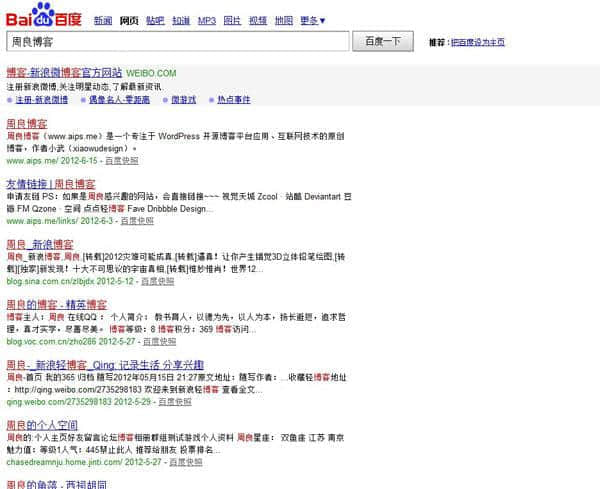
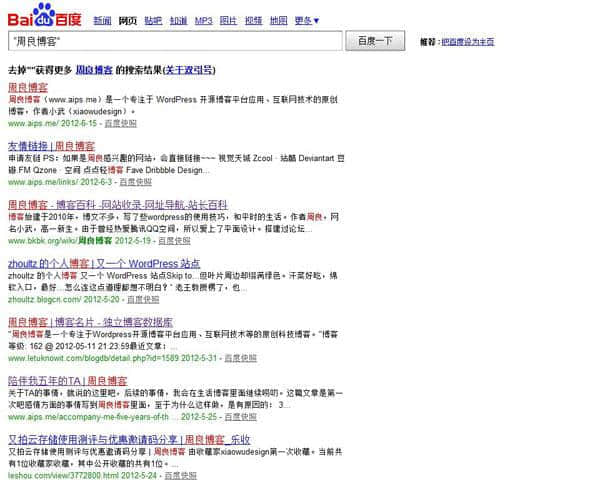
As you can see from the image above, most of the search results don’t contain the complete phrase “Zhou Liang Blog” — in some pages, the words “Zhou Liang” and “Blog” appear in different locations with gaps between them, and not necessarily in the same order. After adding double quotes around “Zhou Liang Blog” and searching again, as shown below, all results contain the complete and ordered phrase Zhou Liang Blog. Using double quotes makes it easier to find specific keywords and locate the content you need.
2. Minus Sign (Search: keyword -unwanted_keyword)
The minus sign tells the search engine to exclude pages containing the word that follows it. When using this operator, there must be a space before the minus sign, but no space after it — the excluded term must follow immediately. Both Google and Baidu support this operator. The minus sign operator is especially useful for finding specific files when certain terms have multiple meanings.
3. Asterisk (Search: Zhou Liang*ke)
The asterisk is a common wildcard character that can also be used in search engines. Baidu does not support the * operator.
For example, searching Zhou Liang*ke on Google, where * represents any text, will return results that go beyond just pages containing “Zhou Liang Blog.”
4. inurl: (Search: inurl:imzl.com)
The inurl: operator searches for pages where the query term appears in the URL. Both Baidu and Google support the inurl: operator. It works with both English and Chinese terms.
For example, searching inurl:imzl.com will return pages whose URLs contain this keyword. My blog ranks at the top for this search precisely because its domain contains imzl.com.
If you work in SEO, the inurl: operator will be very useful, as it helps you quickly identify competitors (having keywords in the URL has some impact on rankings).
5. inanchor:
Results from this operator are pages whose inbound link anchor text contains the search term. Baidu does not support this. Since it’s not commonly used, I won’t go into detail.
6. intitle:
Returns pages where the title tag contains the keyword. Both Baidu and Google support intitle:. The title is currently the most important on-page optimization factor. Virtually every website puts its keywords in the title. Pages found with the intitle: operator are your true competitors. If a keyword only appears in the visible text of a page but not in the title, in most cases that page hasn’t been specifically optimized for that keyword.
7. allintitle:
Returns pages whose titles contain multiple keywords. Separate multiple keywords with spaces. For example, searching allintitle:Zhou Liang blog Internet is equivalent to intitle:Zhou Liang intitle:blog intitle:Internet — all returned pages will have titles containing “Zhou Liang,” “blog,” and “Internet.”
8. allinurl:
Similar to the allintitle: operator — I’m not sure how else to explain it…
9. filetype:
Used for searching specific file formats. For example: filetype:pdf Zhou Liang Blog displays all PDF files containing “Zhou Liang Blog.” The filetype operator is great for finding specific resources like PDF ebooks, Word documents, and more. Both Google and Baidu support the filetype: operator.
10. site:
This is probably the most familiar advanced search operator — it’s used to search all pages under a specific domain. For example, searching site:imzl.com returns all indexed pages under the imzl.com domain. This is arguably the most direct way to check how many pages a website has indexed. The site: operator also works with subdomains. However, site: results aren’t entirely accurate, especially on Google, where indexed page counts often fluctuate dramatically — use them as a reference only, not as gospel.
11. link:
Another commonly used operator that searches for backlinks to a specific URL, including both internal and external links. Baidu doesn’t support it, and Google only returns a near-random subset from its index, making it practically useless.
12. linkdomain:
Yahoo returns backlinks for a given domain. Compared to the link: operator, Yahoo’s linkdomain: provides relatively accurate backlink data. Combined with the minus sign operator, you can obtain fairly comprehensive external link data.
13. related:
Returns pages that Google considers related to a given website. For example, searching related:imzl.com will show pages that Google deems associated with Zhou Liang’s blog (though if you search now, you probably won’t find anything). Google hasn’t clearly stated what “related” means exactly, but it’s generally believed to refer to websites that share common external links.
OK, that wraps up this guide to advanced search engine operators. Beyond the thirteen operators described above, you can also combine multiple operators together. That’s how you can truly pinpoint the resources you need!