

I previously introduced Upyun cloud storage and shared a guide on Setting Up Full-Site CDN Acceleration for WordPress with W3 Total Cache and Upyun. Today I’d like to introduce another static file storage service: Qiniu Cloud Storage. Provided by Qiniu, it’s an online storage service that offers unlimited cloud storage to enterprise clients. Unlike traditional cloud storage services (such as Amazon S3 or Upyun), Qiniu also features upload/download transfer acceleration and rich media cloud processing capabilities.
Qiniu Cloud Storage supports custom domain binding (requires an ICP-registered domain; if yours isn’t registered, you can still use Qiniu’s provided subdomain), full-network CDN acceleration (multiple data centers + acceleration nodes for both uploads and downloads), continuous availability with infinite scalability, and pay-as-you-go pricing with no hardware investment. By signing up through my blog’s referral link, you’ll permanently receive a free tier: 10 GB storage, 10 GB monthly download traffic, 100,000 PUT/DELETE requests per month, and 1,000,000 GET requests per month. You only pay after exceeding these limits, and the pricing is very affordable — for small sites, it costs just a few yuan per year.
Key Features of Qiniu Cloud Storage:
-
Cloud Storage: Store static files including images, audio/video, and even CSS, JS, plus other files and unstructured data.
-
Cloud Processing: In my opinion, this is Qiniu’s strongest feature — it supports online compression and conversion of images, audio, video, and other resources, with callback functionality for custom data processing.
-
Cloud Acceleration: Qiniu supports bidirectional upload/download acceleration with no file size limit for single uploads and support for resumable transfers. Acceleration nodes distributed across regions automatically select the nearest node to the user, ensuring optimal data transfer speeds.
-
API Operations: Qiniu provides a comprehensive set of APIs, SDKs, and tutorials to help you get started.
-
Thumbnails: Qiniu supports generating images at different size specifications with customizable dimensions, serving different images based on the user’s display resolution for the optimal balance between download speed and viewing experience. Defining thumbnails is extremely convenient — just configure them through Qiniu’s web admin panel.
-
Custom Domain Binding: As long as your domain has passed ICP registration, you can bind a subdomain to your storage bucket and access static resources via that subdomain (detailed instructions below).
-
CDN Mirror Storage: Unlike Amazon S3 and Upyun, Qiniu also supports traditional CDN mirror storage. With this feature, you don’t need to upload existing images to Qiniu’s servers — just make some configurations on your website and you’re set for static file acceleration! (The principle: when the requested file doesn’t exist in cloud storage, it fetches from your specified domain and stores it in the cloud. This significantly reduces migration costs and eliminates the hassle of developing plugins for various platforms. As long as your resource files use an independent domain, migrating to Qiniu is incredibly straightforward.)
Plugin-Free CDN Acceleration for WordPress Static Files
- If you prefer not to use plugins, you can use this method to set up Qiniu CDN static file acceleration for WordPress.
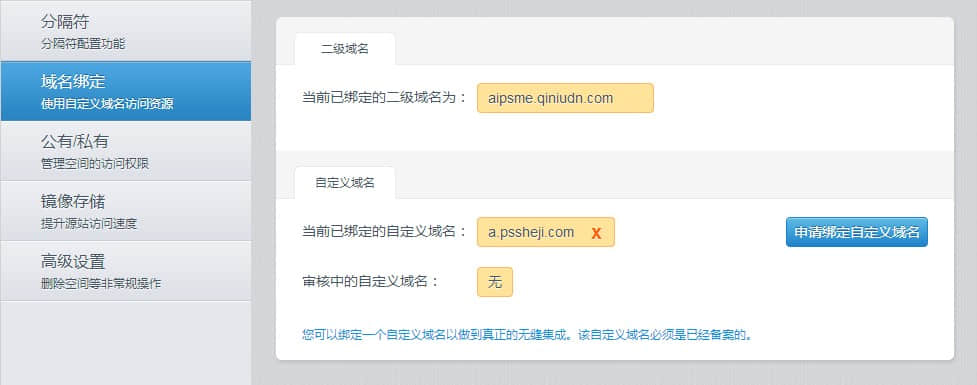
- Log into the Qiniu Cloud Storage admin panel: https://portal.qiniu.com/, and configure your domain binding as shown below:
-
If your domain has passed ICP registration, you can set up a subdomain as the access address for static stored files. It will be activated after Qiniu staff review. (Usage: In your DNS settings, CNAME your subdomain to the xxx.qiniudn.com subdomain you’re currently bound to.)
-
With the domain configured, we need to set up the WordPress site to enable Qiniu’s acceleration service. Navigate to
https://imzl.com/wp-admin/options.php(replace the domain with your own), press Ctrl+F to find theupload_url_pathoption, and change it to your Qiniu domain or your bound subdomain. Mine is set tohttp://aipsme.qiniudn.com. (Note: you must includehttp://, and the domain must not end with/.) See the detailed settings below:

Using Denis’s Plugin for WordPress Static File CDN Acceleration
The well-known WordPress blogger Denis developed a simple yet practical plugin specifically for Qiniu Cloud Storage. If you find my plugin-free method above too cumbersome, give this plugin a try.
- As before, you need to bind your domain in the Qiniu admin panel. If you’ve already done so, skip to step 2.
- Download the Qiniu Mirror Storage WordPress Plugin, upload and activate it, then go to WordPress Admin > Settings > Qiniu Mirror Storage and enter the domain you bound earlier (make sure to include
http://). You can also configure whether to cache your theme’s JS, CSS, and background images to Qiniu:

Making WordPress Plugins Support Qiniu Cloud Storage CDN
After following the methods described above, your WordPress site will have completed most of the CDN acceleration. However, you may notice that some plugins load JS and CSS files without using Qiniu’s CDN — so what do we do?
Simply add two parameters to wp-config.php. Open wp-config.php and add the following:
define("WP_CONTENT_URL", "https://imzl.com/wp-content");
define("COOKIE_DOMAIN", "cdn.imzl.com");
My goal is to load everything in the wp-content directory through cdn.imzl.com. Similarly, you can replace this domain with your Qiniu static file domain.
Additionally, I use the COOKIE_DOMAIN constant to restrict the cookie scope, so when the browser loads content from the CDN, the request headers won’t carry cookies from the main domain, saving bandwidth and improving load speed. (Of course, if you’re using Qiniu, this is less of a concern since Qiniu’s static files are already fast and won’t carry cookies.)
If you find this method inconvenient, or if your WordPress site uses the WP Super Cache plugin, you can try Denis’s WP Super Cache + Qiniu Mirror Storage for CDN acceleration.
OK, this article should cover quite a few methods for accelerating WordPress with Qiniu Cloud Storage and hopefully be of some help. Currently, signing up for Qiniu gives you a permanent free tier: 10 GB storage, 10 GB monthly download traffic, 100,000 PUT/DELETE requests per month, and 1,000,000 GET requests per month. You only pay after exceeding these limits, and the pricing is very affordable — for small sites, it costs just a few yuan per year. You can decide whether to pay after exceeding the free tier. So why not give your WordPress a speed boost?
Sign up for Qiniu Cloud Storage: https://imzl.com/go/qiniu/